
SetDateFilter()
The SetDateFilter() function locks the selection of dates in the given range for the date-type field.
See also remarks on using this function in the example no. 5 below.
SetDateFilter(dateTypefield, firstDate, secondDate, application);Function arguments
Dział zatytułowany „Function arguments”- dateTypefield – (String) a name of the date-type field on the case form;
- firstDate – (String) the first date of the range;
- secondDate – (String) [optional] the second date of the range;
- application – (String) to which date range the filter should apply to. ALLOWED VALUES: [ „after”, „before”, „between”, „out of range „].
Return value
Dział zatytułowany „Return value”This function returns Boolean. This function always returns true.
Examples
Dział zatytułowany „Examples”Example 1
Dział zatytułowany „Example 1”This will disable the selection of dates before the date passed as an argument.
SetDateFilter("some date field", "2021-11-15", "after");Example 2
Dział zatytułowany „Example 2”This will disable the selection of dates after the date passed as an argument.
SetDateFilter("some date field", "2021-11-15", "before");Example 3
Dział zatytułowany „Example 3”This will disable the selection of dates between dates passed as agruments.
SetDateFilter("fieldName", "2021-11-15", "2021-11-22", "between");Example 4
Dział zatytułowany „Example 4”This will disable the selection of all dates except between dates passed as agruments.
SetDateFilter("fieldName", "2021-11-15", "2021-11-22", "out of range");Example 5
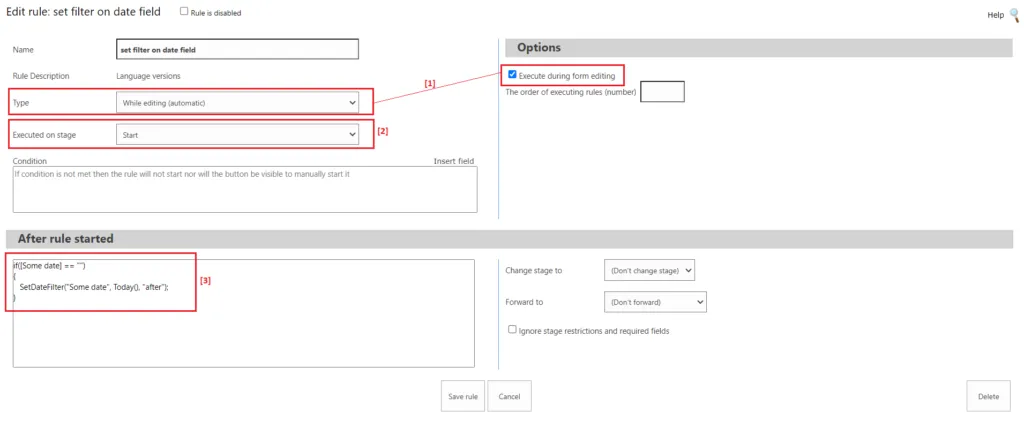
Dział zatytułowany „Example 5”As the best practice it is recommended to call SetDateFilter() function inside an automatic rule ([1] on the picture below), on the selected stage ([2]), and inside if(…) condition when the date-type field is empty ([3]).