

How to set up access levels to AMODIT WebAPI
Summary
Dział zatytułowany „Summary”Mainly due to security reasons you have to set up access levels to AMODIT WebAPI (SOAP).
Prerequisities
Dział zatytułowany „Prerequisities”You have to possess administrative rights to the system.
Follow this steps to change access levels:
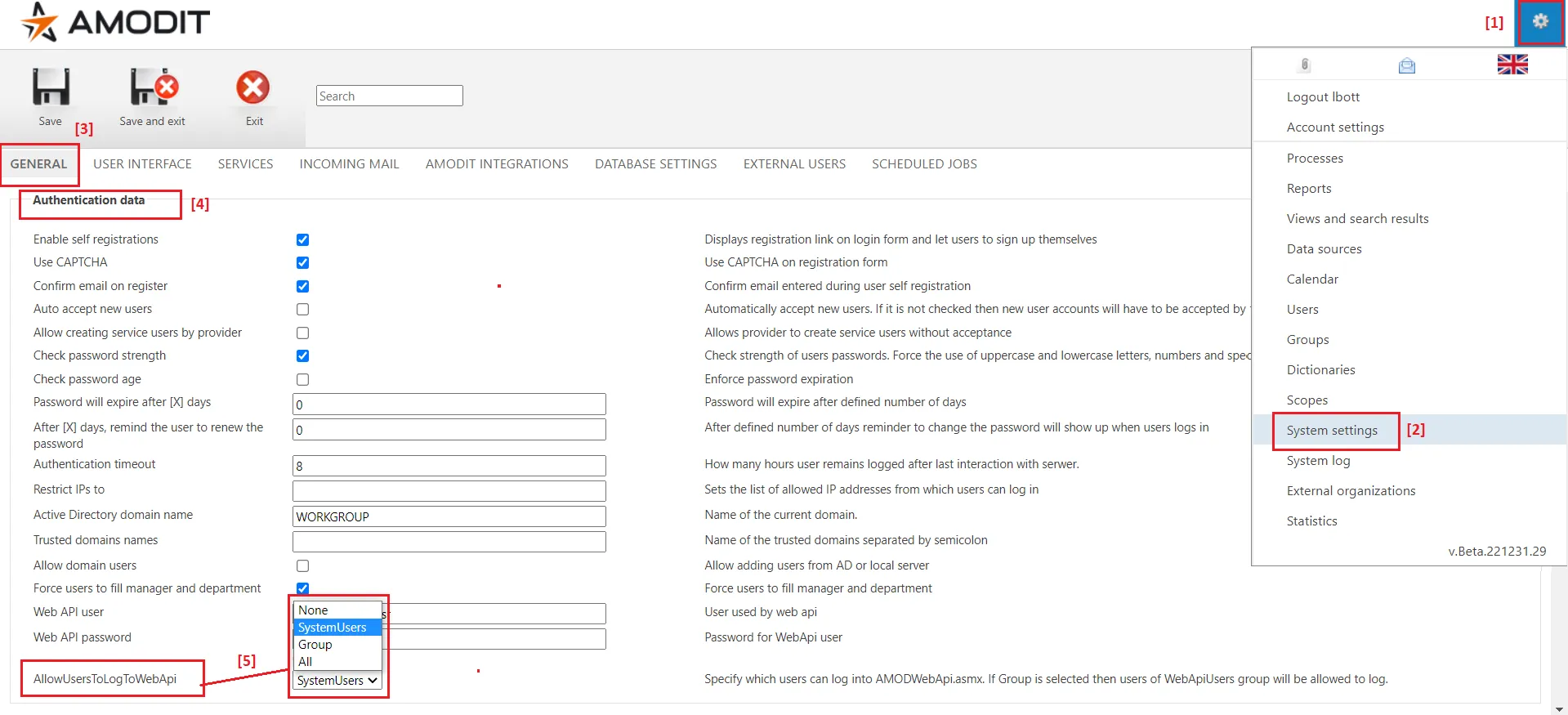
- [1], [2] Go to system settings.
- [3] Select „General” tab.
- [4] Go to „Authentication data” section.
- [5] Choose required access level to AMODIT WebAPI in „AllowUsersToLogWebApi” parameter. There are 4 options:
- None – you cannot use AMODIT WebAPI, access is blocked;
- SystemUsers – (default value) only users marked as the system users may access WebAPI;
- Group – only members of „WebApiUsers” group (the group of that name must exist) may access WebAPI;
- All – all active users (including system ones) may access WebAPI.